
Make job search suck a LOT lessDo more on the Job Boards you already use.

Your job boards
We don't replace them. We help you use them more.
We love LinkedIn. It's full of amazing jobs, and there just aren't enough hours in the day to apply to all of them. HeyJob helps you look at more jobs and apply to the ones where you're the most qualified, instead of mass-applying by hand. It works on Indeed, Glassdoor, ZipRecruiter, and Craigslist too; queue stays on LinkedIn, and the other boards stay view, hide, and log only.





LinkedIn power search
Get more from every LinkedIn search.
One LinkedIn search can turn up hundreds of great jobs. Describe the role in plain words, keep several searches on a schedule, and each check drops what you already dealt with.

Say it in plain words
Describe the job the way you'd say it out loud. AI turns that sentence into the search: keywords, location, workplace, salary, and companies to leave out. You review it before anything is saved.

Several searches, each on a clock
Save more than one LinkedIn search. Each one checks on its own schedule, once a day or every two days. Pause one, copy it, or run it now.

Then focus on your best fits
After results come back, companies you never want are removed, along with jobs you already applied to or hid. What remains is a short list of the jobs most worth your time.

Magic Buttons + side panel
One click on LinkedIn. Saved to your side panel.
Jobs, people and posts each get a button right where you find them. Press it and the item lands in your side panel, ready to open in the full Job Log, Contacts or Feed view when you want the detail.
- Jobs. Applied, Hide, Watch and Queue on every card, with green and red tints and an AI score dial.
- People. Add me on a profile, or Save me and Save us on your connections, and they join your Contacts.
- Posts. Save Me on any feed post. A job hiding inside it is added as Watching.
- Side panel and Job Log. Everything you press lands in your side panel at once. Open the full view for notes, tags, reminders and stages.
Real-time intent matching
Your LinkedIn feed is a gold mine.
Jobs, important posts and the right people go by in seconds, and most are gone before you look.
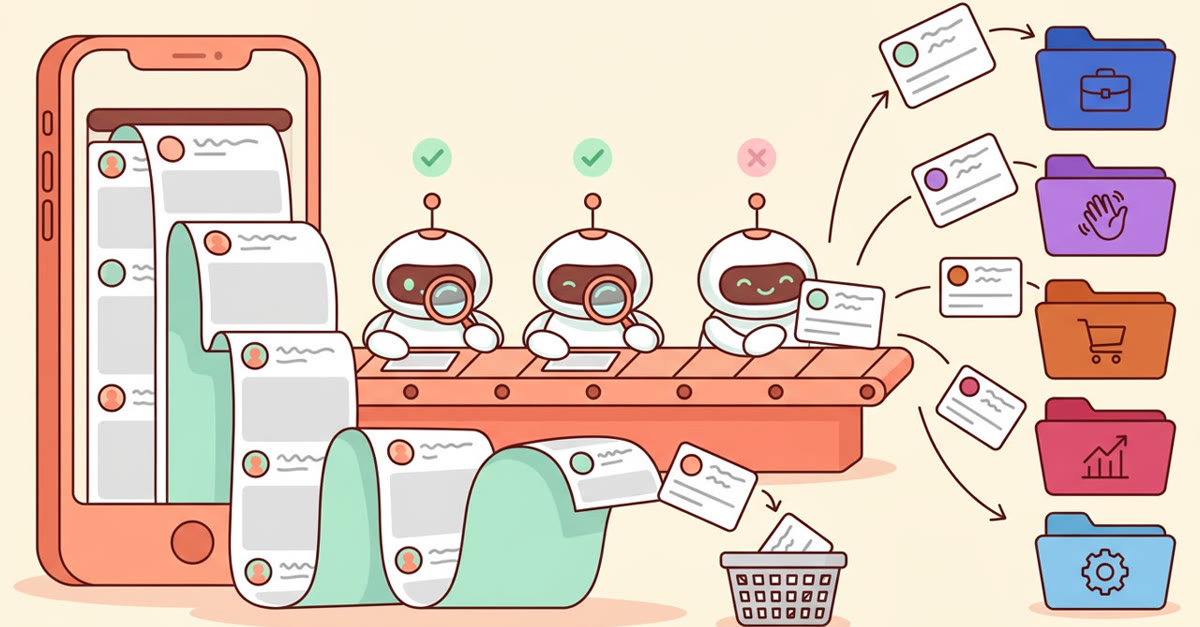
Our robots dig through the feed in real time and flag only what you care about.
- ✓Tell them what you care about in plain English, up to five intents.
- ✓Hiring posts, funding news and "open to work" signals are caught the moment they scroll by.
- ✓AI semantic analysis checks each post for meaning, not just keywords.
- ✓Matches turn green as you scroll, so you see the robots working live.
Professional site
Professional Site & Portfolio
A public page of your work, so you stand out from other résumés.
Robots crank away and make the site pretty — rich content for recruiters and hiring managers.
- ✓You keep the page forever, even on a Free plan.
- ✓It stays up. You can keep editing it.
- ✓Portfolio pieces, your intro, and music stay yours.


The right job
AI finds the fit in the pile.
Before you apply, see how a posting lines up with your resume. A score, whether the level fits, and which requirements you already match — so the mountain gets smaller.
- ✓Resume score — a 0–100 match with a dial on every LinkedIn and ATS job card, plus a banner summary on the detail page
- ✓Position analysis — your recent titles vs the role's level and discipline, with an aligned / stretch / mismatch read
- ✓Skills & phrases — each JD requirement scored against your resume with a short explanation
- ✓Resume updates — JD-grounded bullet suggestions per past role, with one-click copy when the discipline fits
Contacts pipeline
Tame your LinkedIn network. Work it like a pipeline.
Sales, recruiting and job hunting all run on the same thing: the right people, nudged at the right time. HeyJob gives every contact a stage and a next step, so nobody goes cold.
- Sales
- Recruiting
- Job hunting
- ✓Stages, not a pile. Save people as you browse LinkedIn, then move them lane to lane like deals.
- ✓Follow-ups that nudge. Pick a date on any contact and get a reminder when it’s due.
- ✓Notes and tags that stick. Jot what you talked about, tag by team, role or campaign, find it in a second.
- ✓Take it anywhere. Export a CSV that imports into HubSpot or Salesforce, or plain CSV for anything else.


While you sleep
Auto-apply while you sleep.
Queue from LinkedIn and leave Chrome open. HeyJob fills each form and submits on Greenhouse, Lever, and Ashby when nothing needs review; Workday, Gem, and Rippling stop at the form. Your log shows what went out and what still needs you.
- ✓Queue a pile before bed. Chrome and the computer stay on; you don't have to watch.
- ✓Works through them one at a time, in the background.
- ✓Greenhouse, Lever and Ashby submit themselves when the form is complete.
- ✓Morning log: Applied, Needs you, or why it stopped.





The best autofill on the market
Accurate fills that learn — and share fixes with the network.
AI autofill learns from your profile, remembers one-off answers, and picks up fixes the network shares when a form asks something new. Queue several jobs with Chrome open — they fill one after another and auto-submit on supported ATSs while you sleep.
- ✓Greenhouse, Lever, Ashby, Workday, Gem, and Rippling — dropdowns, typeaheads, and multi-step wizards.
- ✓Auto Submit on Greenhouse, Lever, and Ashby when the form is complete and nothing needs review.
- ✓Several queue items at once — tabs advance in the background while you browse or sleep.
- ✓Shared question patterns from the network ship as matching improvements — not your answers, not your resume.

Your assistant
A brief in the morning. A calendar for the rest.
A minute-long Daily AI brief covers new jobs, the week so far, what's next, and a checklist — read it or listen with slides. Interviews, follow-ups, and search alerts land on a calendar that fills itself.
- ✓Text, audio, or audio with slides. You pick the voice and the tone.
- ✓Applications, interviews, follow-ups and search alerts, by day, week or month.
- ✓Personal reminders stay off the job log. A call or the gym doesn't become an application.
- ✓When a form asks something new, you see the suggested answer before it is used.


AI at the foundations
Built with AI inside — not bolted on top.
Other tools grafted a chat box onto legacy software and called it AI. Their AI slop sucks — it does not know your queue, your log, or the form in front of you. HeyJob wired scoring, autofill, briefs, matching, and assist into one stack from day one.
- ✓AI title match and Quick AI match on listings — cheap checks that don't burn your scan allowance.
- ✓Resume analysis, recommendation breakdowns, and JD-grounded bullet suggestions on the job page.
- ✓Autofill that learns answers, plus AI Assist when a required question has no profile match.
- ✓Daily AI brief, voices, and Sara's tone — same stack, not a separate toy app.
Making job search fun
Sara, your AI assistant, keeps the grind human.
Pick how HeyJob talks to you — warm encouragement like your mom checking in, or a drill sergeant who keeps you moving. Sara shapes the Daily AI brief, reminders, and nudges so the search feels less like punishment and more like a coach in your corner.
- ✓Choose a voice and tone for audio briefs — calm, upbeat, or straight to the point.
- ✓Switch personalities anytime: gentle check-ins one week, no-nonsense accountability the next.
- ✓Same AI underneath — personalization is about how it feels, not a different product.
- ✓Briefs, calendar nudges, and queue updates stay in character so you actually want to open them.


Your search workflow
Design your own search workflow.
Name the swimlane columns yourself — Phone screen, Onsite, Offer, whatever you track. You lay out headers, drop job cards in each lane, and filter when the pile gets wide. Built for spreadsheet brains who want the whole search on one canvas.
- ✓Custom column headers — your statuses, not ours.
- ✓Drag cards lane to lane; notes and reminders stay on the job.
- ✓Filter and scan lanes fast — like Excel pivot energy, without exporting.
- ✓Interview dates and follow-ups visible on the card in the column that fits.
Why HeyJob
Making job search suck a LOT less
Job boards turn evenings into tab hell. HeyJob's AI and cute helper robots stage the grind — scoring, filling, queuing — so you get happier hours back with family and friends, and the search starts to feel fun again.
- ✓Less grinding on job boards — the pile gets sorted while you’re at dinner or on a walk
- ✓More time with family and friends instead of another late-night apply session
- ✓Happier mornings: a short AI brief and a checklist, not a guilt spiral of open tabs
- ✓A job search process you can actually enjoy — robots do the boring cards; you show up for the human parts


HeyJob in your language
Guides that speak your language. The app is catching up.
Pick a language from the menu at the top and the website, the docs and every guide switch with you. The app itself is being localized too — hang in there — so soon you can do everything in your native language.
- ✓Website, docs and guides in 13 languages: English, Spanish, Portuguese, Chinese (Simplified and Traditional), Japanese, Korean, Arabic, Turkish, Vietnamese, Indonesian, Thai, Urdu, British English, German, Hindi, French, Italian, Dutch, Polish, Bengali, and Malay.
- ✓One choice, everywhere — the language you pick here carries over to the docs.
- ✓Right-to-left done properly for Arabic and Urdu.
- ✓The extension is next: autofill, the Job Log and Sara's tips in your native language.
Privacy
Your data is never sold.
Profile, résumé and job log stay in your browser until you run AI or turn on cloud sync.
- ✓Résumé text leaves the browser only for AI you request or sync you enable.
- ✓Stripe, analytics and AI providers get only what those features need.
- ✓Export or erase from Settings; turn off analytics in Advanced.

Pricing
Free to track and apply; Pro is $9/month or $49/year (55% off yearly).
Track and apply for free, no card.
- ✓Buttons and colours on LinkedIn and other boards
- ✓View, hide, archive, Watch and Applied — no limits
- ✓Autofill on Greenhouse, Ashby, Lever, Workday, Gem and Rippling (50 apps)
- ✓Apply queue while Chrome stays open (shares those 50 apps)
- ✓Job Alerts, Swimlanes, reminders and a calendar
- ✓Unlimited job log with notes and CSV export
- ✓Save up to 100 LinkedIn contacts with stages, notes and follow-ups
- ✓Profile and résumé parsing on your machine
- ✓40 AI credits for life — every AI feature, including AI answers and Resume AI
$4.08/month — save $59 (55%) vs monthly
For the weeks when you're applying every day.
- ✓Everything in Free
- ✓Unlimited Autofill and Queue — no 50-app cap
- ✓Unlimited LinkedIn contacts — no 100-person cap
- ✓AI allowance that refills with every payment (yearly: the whole year up front)
- ✓Multiple résumés
- ✓Cloud sync across devices
- ✓Résumé template downloads
- ✓Daily AI brief by email
Get Notified
Add AI credits
Top up your AI allowance — you choose the amount at checkout. Opens HeyJob's Payment tab in Chrome so credits land on the right account (no orphan website charges).
Free vs Pro
| Feature | Free | Pro |
|---|---|---|
| View, hide and archiveMark cards you've opened, hidden or archived so the next scroll doesn't start from zero. No count limit on either plan. | ✓ | ✓ |
| Watch and AppliedSave a job for later, or mark it applied. These do not use AI, and they stay available after your AI is used up. | ✓ | ✓ |
| AutofillFills Greenhouse, Ashby, Lever, Workday, Gem and Rippling from your profile. Free stops after 50 apps. Pro has no app cap; AI answers on a fill still use your allowance. | 50 apps | No app cap |
| QueueLine up LinkedIn jobs and let Autofill run while Chrome stays open. On Free, Queue shares the 50 Autofill apps. Pro Queue has no app cap. | Shares 50 apps | No app cap |
| Job AlertsRecheck the LinkedIn searches you save, drop jobs you already applied to or hid, and score what's new. Scoring uses your AI. | ✓ | ✓ |
| SwimlanesName your own columns and drag a job from one status to another. Notes and a reminder stay on the job. | ✓ | ✓ |
| Job log and exportApplied, watched, viewed, hidden and queued in one searchable list, with notes, reminders and a CSV export. | ✓ | ✓ |
| ContactsSave people from LinkedIn and keep stages, tags, notes and follow-ups on each one. Free keeps up to 100 people at a time; deleting someone frees a spot. Pro has no cap. | 100 people | No cap |
| AIFree gets 40 AI credits once, for life: a Quick check is 1/10 credit, a Deep dive 1, an audio brief 4. Pro refills one allowance with every payment (the whole year up front on yearly), and every AI feature draws from it. | 40 credits for life | Refills each payment |
| AI answersWhen a form asks something your profile can't answer, AI suggests a reply. You see it before it's used. | ✓ | ✓ |
| Multiple résumésKeep more than one résumé and pick which one a job or an alert uses. | — | ✓ |
| Cloud syncYour profile, log and settings can follow you to another browser. Nothing syncs until you turn it on. | — | ✓ |
| Résumé templatesDownload a résumé built from a template. Each download uses a little of your AI allowance. | — | ✓ |
| Add more AIA one-time top-up: you choose the amount, and it never expires. On Free it does not extend the lifetime totals; it's used after you upgrade. | ✓ | ✓ |
Questions
Do you collect, sell or share my LinkedIn data?
No. We don't collect it, sell it or share it. We don't sell you email addresses for your contacts, and HeyJob never messages anyone for you. The jobs, posts and people you save stay in your own browser's storage, and HeyJob gives you ways to view, sort and organize them. Turn on Cloud sync (Pro) and you get a private backup that only you can restore. The point is to make LinkedIn efficient: find the needle (a job, a prospect, a contact) in the haystack of the feed. We like LinkedIn. We just want it to work harder for you.
Does HeyJob send my resume or profile anywhere?
Profile, résumé, job log and settings stay in Chrome until you run AI or turn on cloud sync — we never sell your data. Pro checks your subscription email with Stripe; optional analytics are counts only (off in Settings → Advanced). AI features send only what that feature needs; see the privacy page for the full list.
Which job boards does it fill?
Autofill targets Greenhouse, Ashby, Lever, Workday, Gem and Rippling, including Workday's account-and-wizard flow. On LinkedIn, Indeed, Glassdoor, ZipRecruiter and Craigslist you get buttons, colours and logging — not LinkedIn Easy Apply fills.
Does the Autofill button submit the application?
On Greenhouse, Lever and Ashby, Auto Submit (default on in Settings → Autofill) presses Submit when the form is complete and nothing needs review. Other ATSs, or anything flagged for you, stop at a filled form for your review. The apply queue uses the same rules.
What happens when the queue can't finish an application?
The tab stays open where it stopped — CAPTCHA, sign-in, validation, or a required answer you have not saved yet. The job log marks Failed submit with a short note so you can finish by hand.
What are AI answers for, and what do they send?
When built-in rules do not recognize a question, optional AI answers draft a reply from your profile and custom Q&A — not your résumé file or job log. Opt-in only: Settings shows what is sent before anything runs, and AI-filled fields are flagged to review.
What happens when a form asks something HeyJob can't answer?
Required gaps open the badge: choose from the form's options or type once; HeyJob saves it as custom Q&A for next time. In the queue the job pauses as Needs answers. You can share question labels and options — never your answer — so the next person is asked before autofill runs.
Is there a free plan?
Yes — job log, alerts, swimlanes, board buttons and hide/view/archive stay unlimited without AI. Free also includes 50 Autofill apps and 40 AI credits, once, for life; queue shares those 50. Pro refills AI each payment and lifts autofill/queue caps — $9/month or $49/year (55% off yearly).
How do I cancel?
In the extension, open Plan → Manage subscription (Stripe billing portal). Pro stays on the email you paid with — no licence keys.
Search less. Do more.
Install, keep your job boards, and let AI sift the pile, apply while you sleep, and check in with a brief.